ICSCracker logo

ICSCracker

Industrial Attack Simulation Engine for OT Validation

Built on a ruggedized industrial hardware platform as its validation carrier, it performs controlled industrial attack simulations and verification tests. It helps product teams and factories validate OT protection effectiveness and supports evidence collection requirements for IEC 62443, CRA, and SEMI E187.

Attack Simulation Hardware + Software View
Test Framework
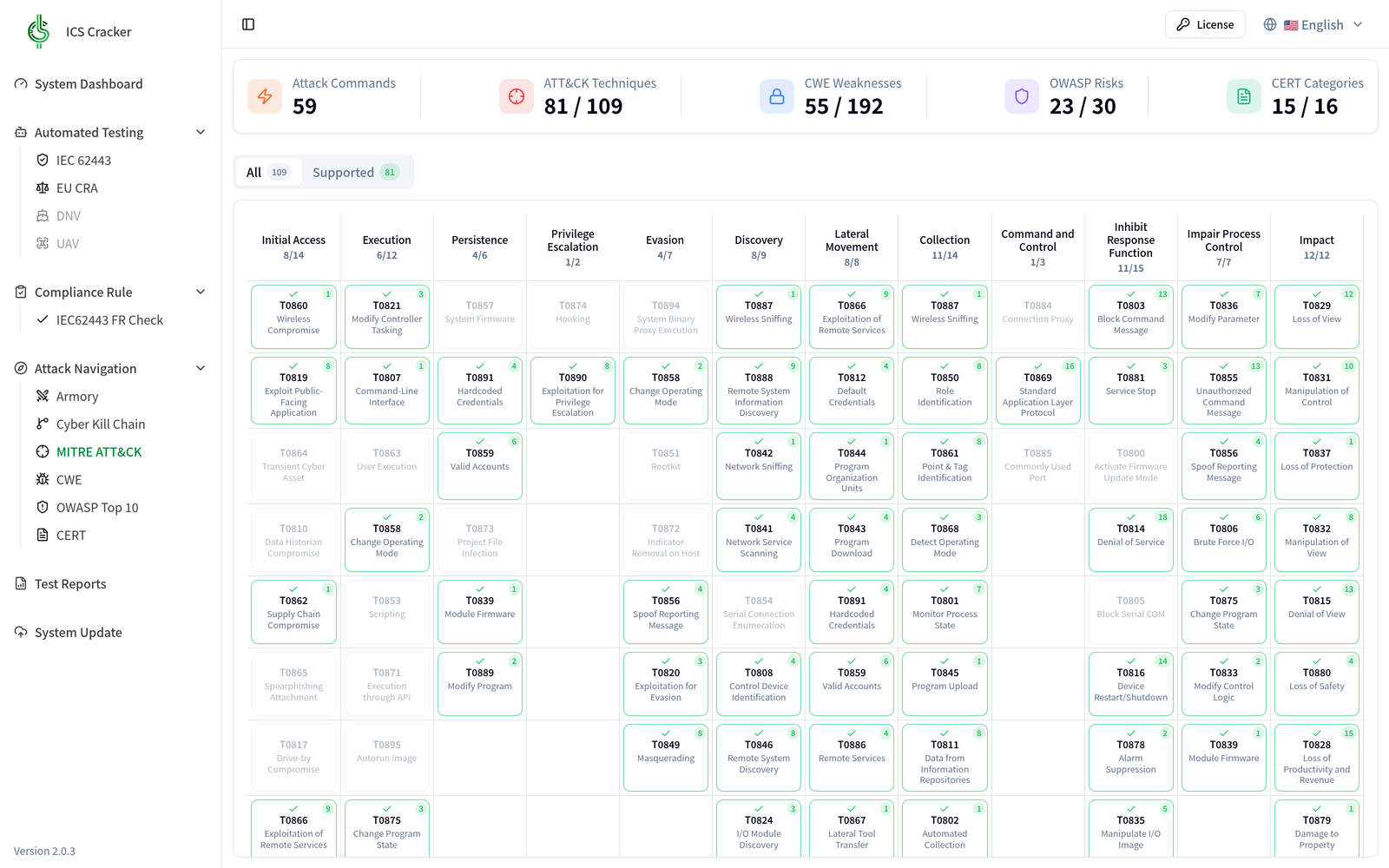
MITRE ATT&CK for ICS
Applicable Scenarios
Lab Validation / Product Security Testing
Output Deliverables
Test Report / Evidence Package

Hardware Teardown

Inside the ICSCracker validation appliance

Scroll to take the current unit apart: fanless aluminium heatsink, chassis body, front I/O faceplate, and DIN-rail bracket.

⊖ DC 12-28V ⊕ PWR-SW CLR_CMOS ATX/AT LAN 1 LAN 2 LAN 3 LAN 4 HDMI USB 2.0 USB 3.2 GEN2 CYBEROTLAB

Scroll to disassemble

  1. 01
    Chassis body

    159 × 132.5 × 35 mm, 0.78 kg aluminium-alloy chassis that barely takes cabinet space.

  2. 02
    Fanless aluminium heatsink

    The fin stack is the chassis — no fan, no filter, nothing to service in a dusty plant.

  3. 03
    Mainboard

    Intel Celeron J6412 quad-core, 8 GB LPDDR4x, M.2 storage, and all four NIC controllers on board.

  4. 04
    Front I/O faceplate

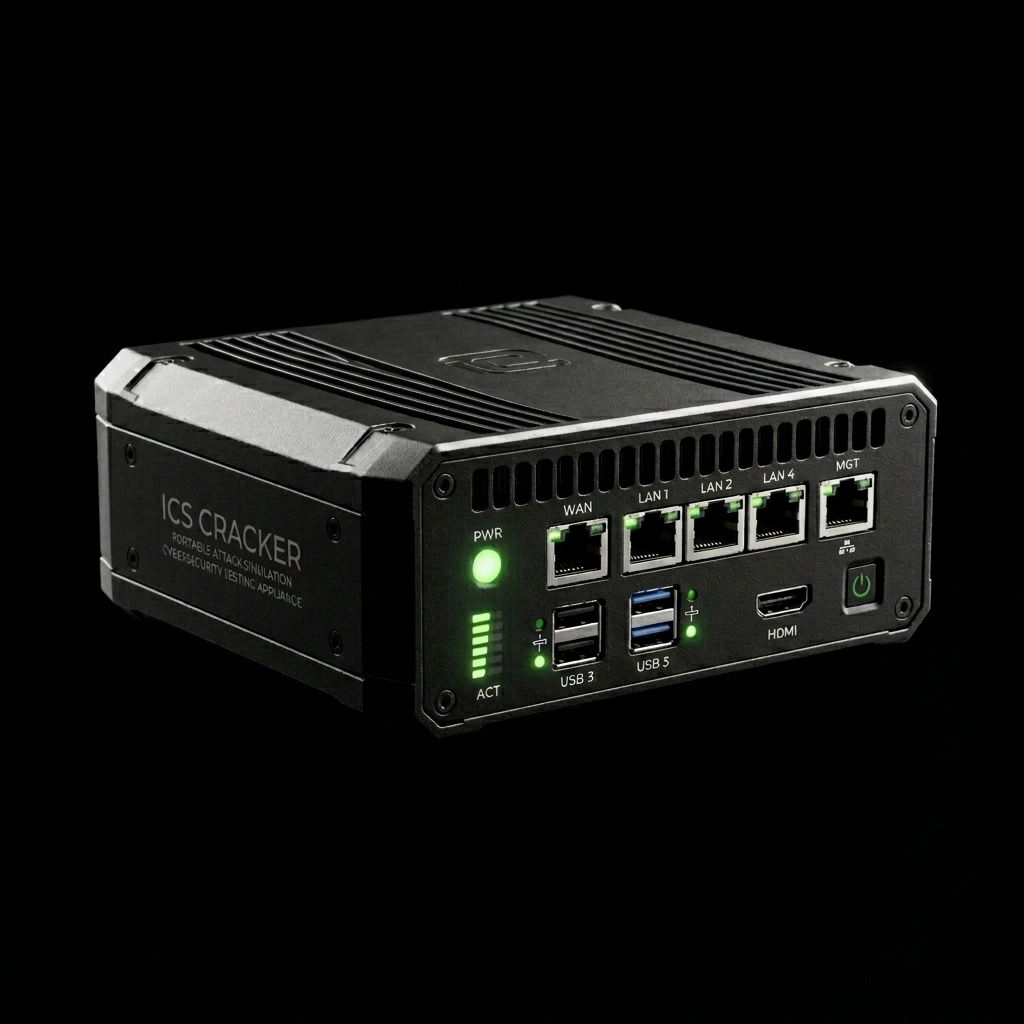
    LAN 1–4 (3× 2.5GbE + 1× GbE) tap OT segments, USB 3.2 Gen2 exports evidence, HDMI drives an on-site console.

  5. 05
    DIN-rail bracket

    Clips straight onto a 35 mm DIN rail — deploys inside the field control cabinet, no rack required.

Connect & Operate

Plug in the cable, land in the console

Patch a cable into any front-panel LAN port and open the management console from a browser on the same segment — no agent to install, no external cloud service. Pick a port below to try it.

INTERACTIVE Click a LAN port on the ICSCracker to patch it in

⊖ DC 12-28V ⊕ PWR-SW CLR_CMOS ATX/AT LAN 1 LAN 2 LAN 3 LAN 4 HDMI USB 2.0 USB 3.2 GEN2 CYBEROTLAB 工程師筆電 ICSCracker 受測設備

No link

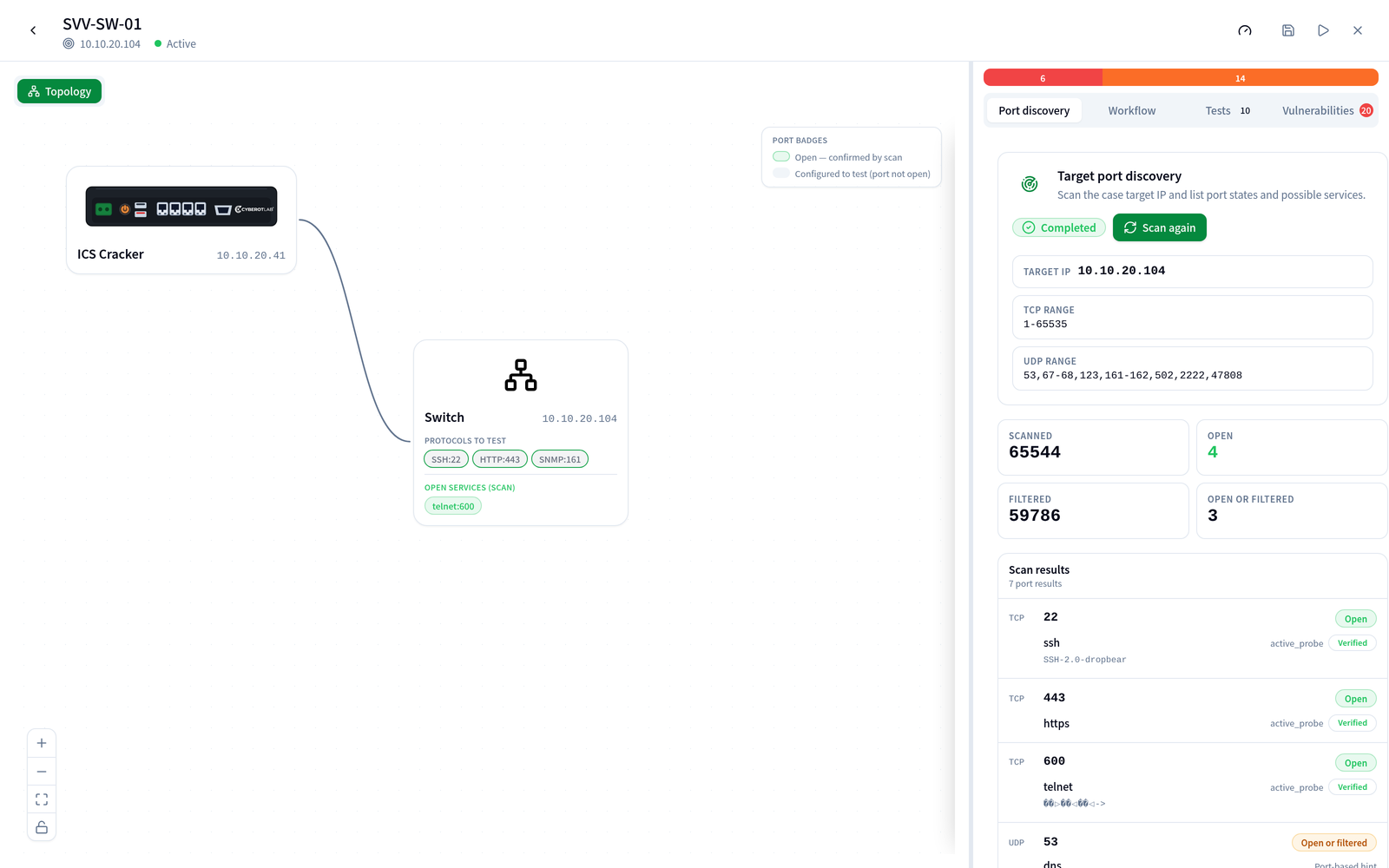
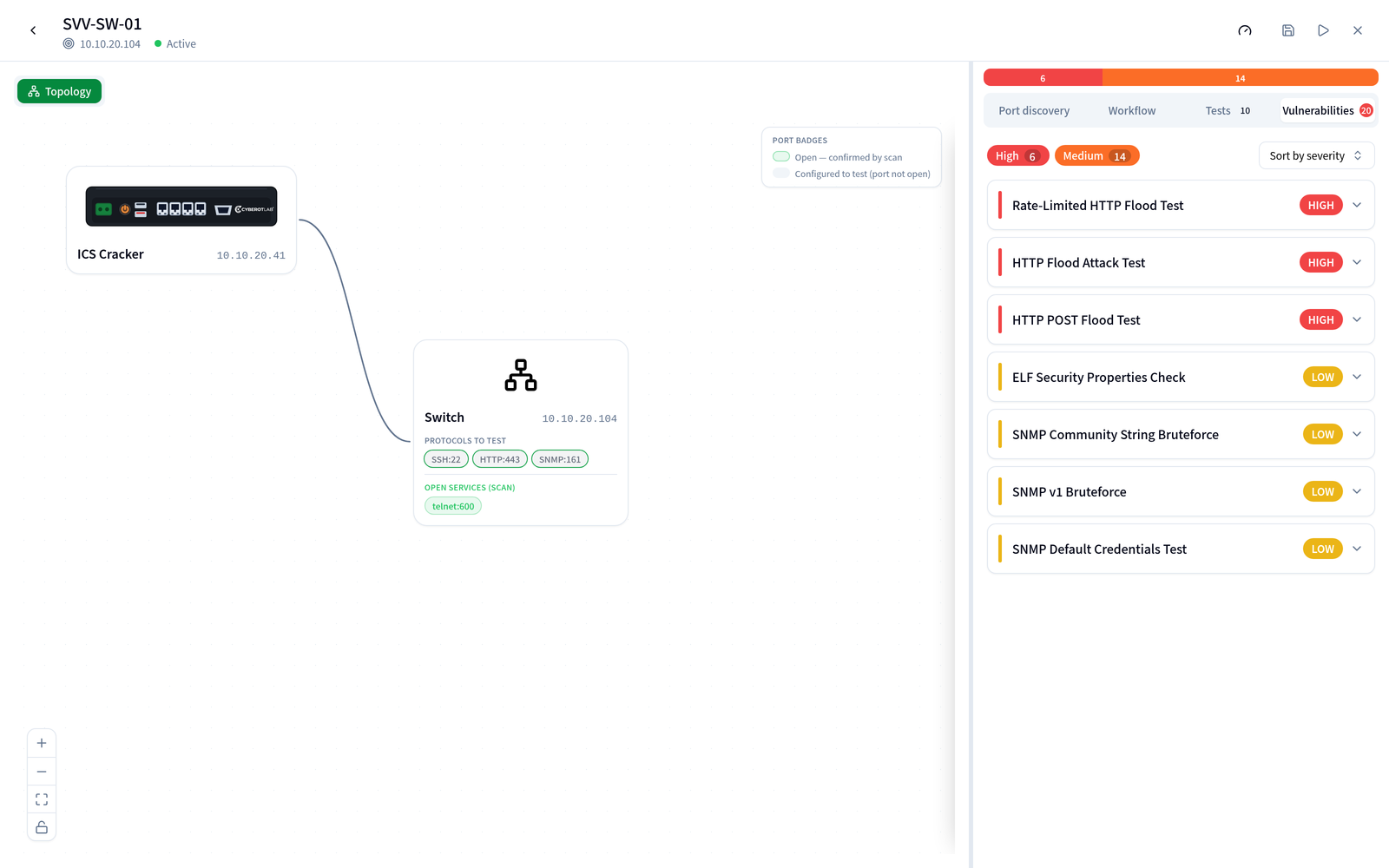
DashboardTarget discoveryHealth check

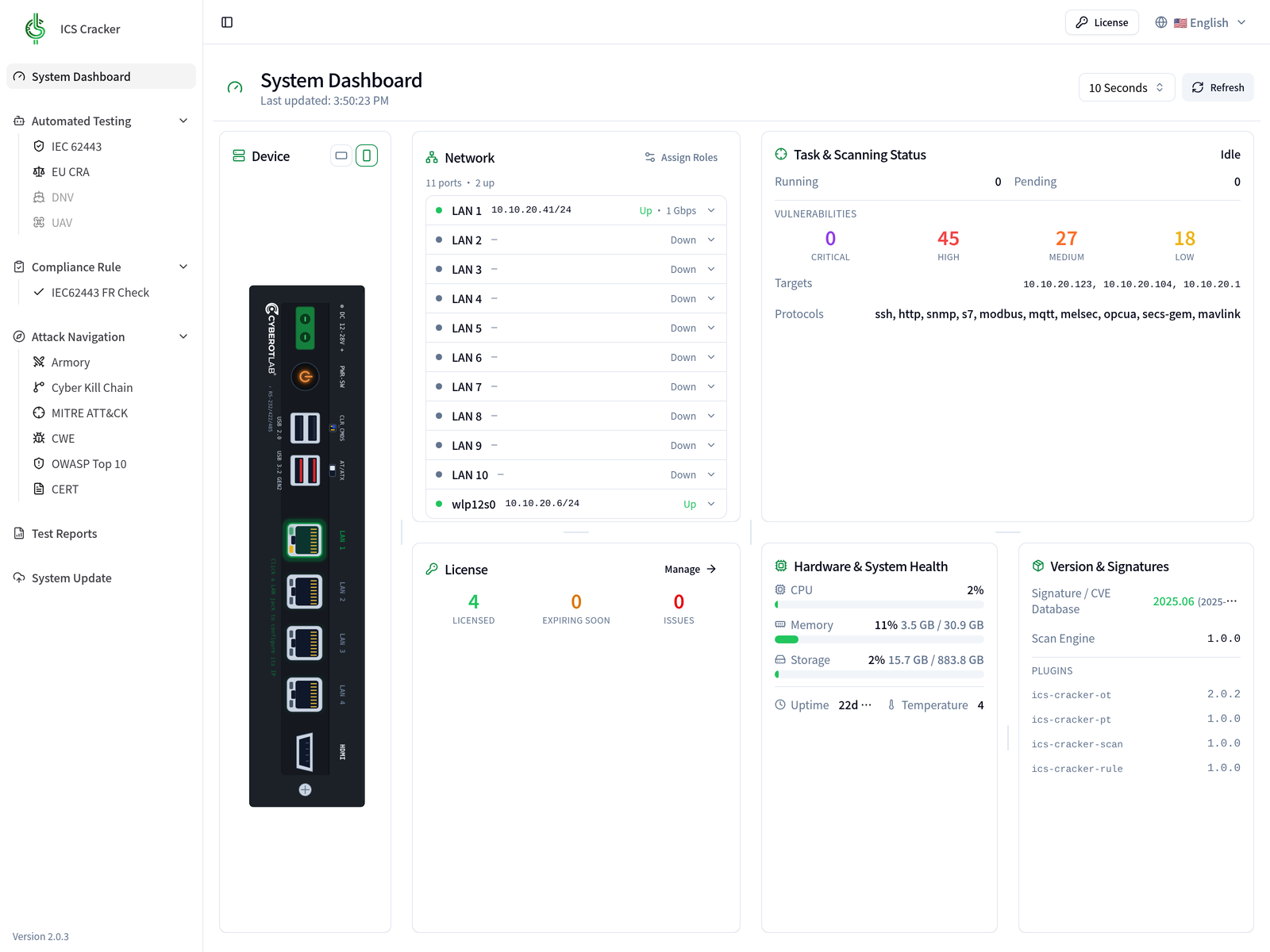
First screen after linking: device and network topology, task status, hardware health, signature version.

http://<ICSCracker-IP>:8080/

How it runs

Five steps from a test case to a compliance report

Every engagement is a saved, repeatable case. Results map onto the frameworks automatically, and the report exports in one click — no more rebuilding a document out of scattered screenshots and notes.

Pick a step to see the actual screen

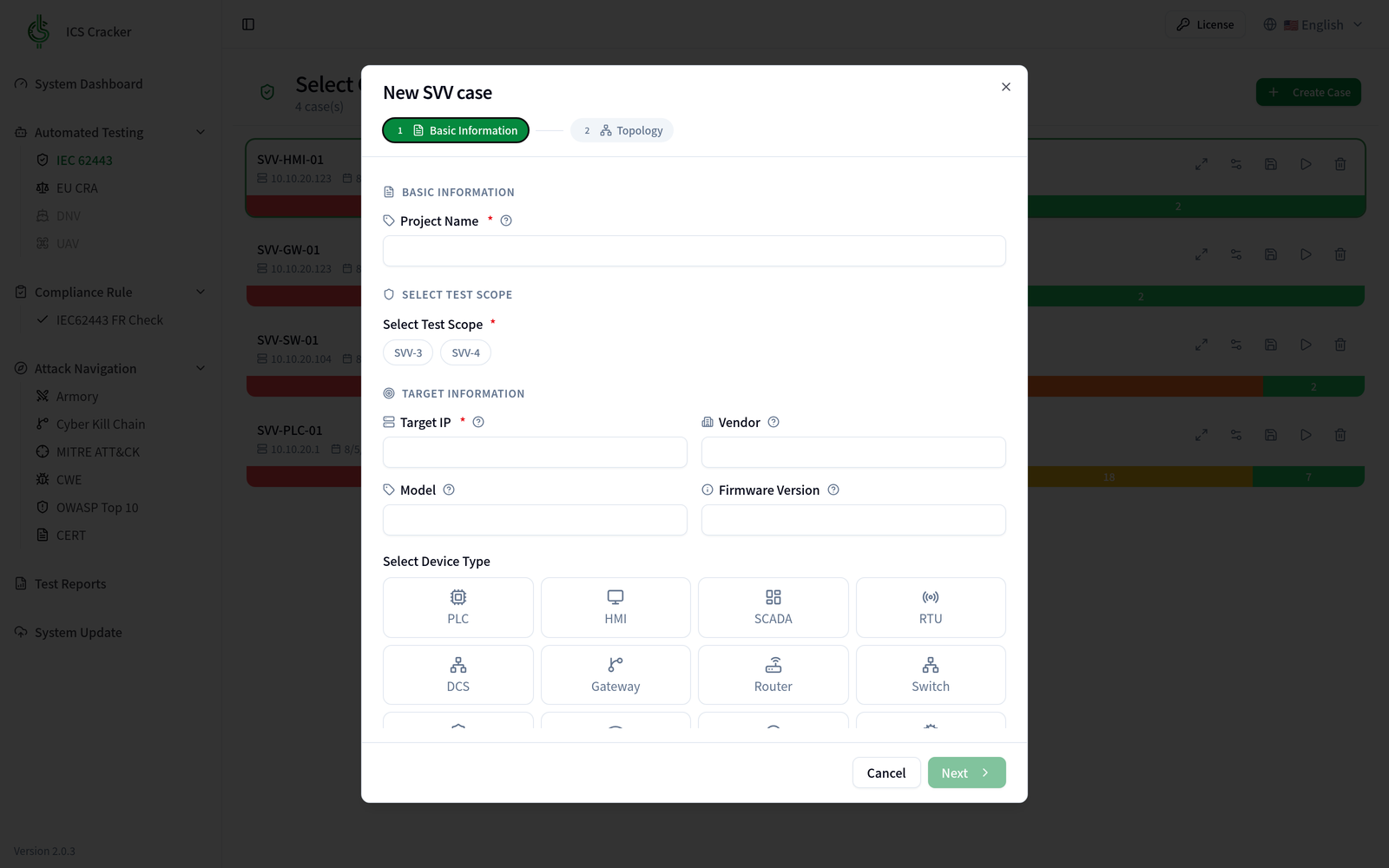
Create the case — Create an SVV case

A two-step wizard: the case details, then the topology. Scope is SVV-3 and/or SVV-4; the target takes an IP, vendor, model and firmware version; device type is a pick from PLC, HMI, SCADA and RTU through to gateways and switches.

Who it is for

  • Equipment makers (OEM/ODM)

    Clear IEC 62443-4-2 and friends before the product ships.

  • Semiconductor equipment

    SEMI E187 compliance checks and incoming equipment acceptance.

  • System integrators

    Penetration testing and vulnerability scanning before handover.

  • Consultants and auditors

    Standards audits, compliance assessment, auditable deliverables.

Coverage

The standards it gets you through

From OT and IIoT protocols through to plain IT networking — and every result maps straight onto IEC 62443, SEMI E187 and EU CRA clauses as deliverable, structured evidence.

20+ Industrial & IT protocols
5 Compliance standards
6 Security frameworks
2 Clicks to a report
  • IEC 62443
    ISA / IEC · industrial security

    A complete path from component to system level, filed by clause and usable as 4-2 component evidence.

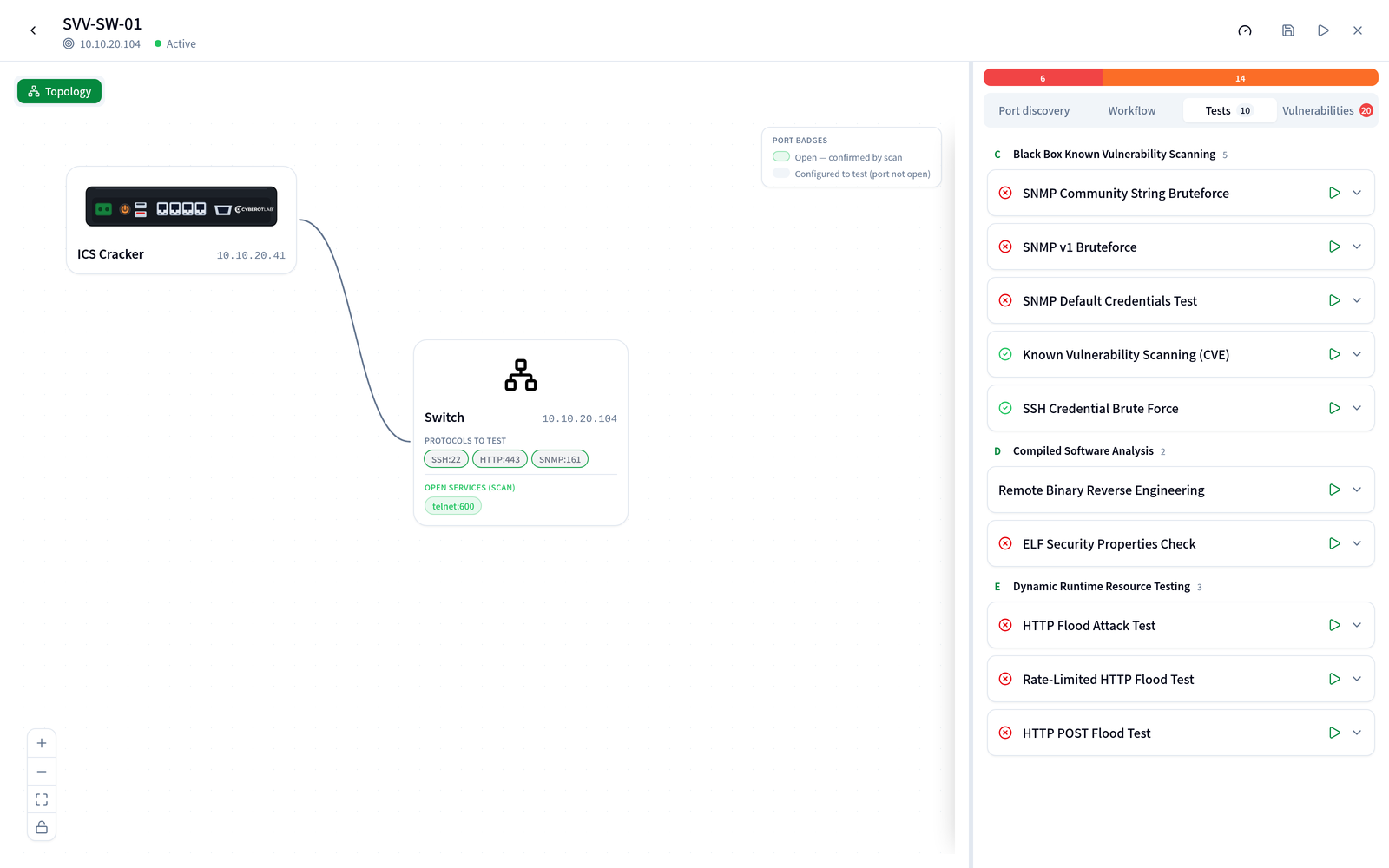
    • SVV-3 vulnerability testing, classified into sub-items (a)-(e)
    • SVV-4 penetration testing, preceded by a TCP/UDP sweep of reachable services
    • Clause-by-clause FR checker with an automatic compliance rate
    • SSH credential testing mapped to SR 1.7 / 1.11
  • SEMI E187
    SEMI · semiconductor equipment

    Ships with the E187 requirement data: assess clause by clause, get a compliance rate, export a standalone report for acceptance and supply-chain audits.

    • Vulnerability mitigation (RQ-00005)
    • Malware scanning and protection (RQ-00006 to 00008)
    • Access control — identification and privilege management (RQ-00009 / 00010)
    • Logging requirements (RQ-00011 / 00012)
  • EU CRA Preview
    EU · Cyber Resilience Act

    The SBOM-centred workflow is usable today; the CRA test case itself is still in development, so teams can start building SBOM and VEX assets ahead of the deadline.

    • CycloneDX SBOM from a source archive or a firmware image
    • Component CVEs matched against the Grype database — offline once downloaded
    • A VEX assessment per CVE, exportable

Frameworks mapped automatically

  • MITRE ATT&CK for ICS
  • Cyber Kill Chain
  • CWE
  • OWASP Web Top 10 (2021)
  • OWASP API Top 10 (2023)
  • OWASP IoT Top 10 (2018)
  • CERT
  • CVE

Protocol support

  • Modbus TCP
  • Siemens S7
  • OPC UA
  • MQTT
  • SECS / GEM
  • SNMP
  • HTTP / HTTPS
  • MAVLink
  • MELSEC
  • DHCP
  • OpenVPN
  • TLS

Over twenty protocols across OT, IIoT and IT networking.

Evidence you can hand over

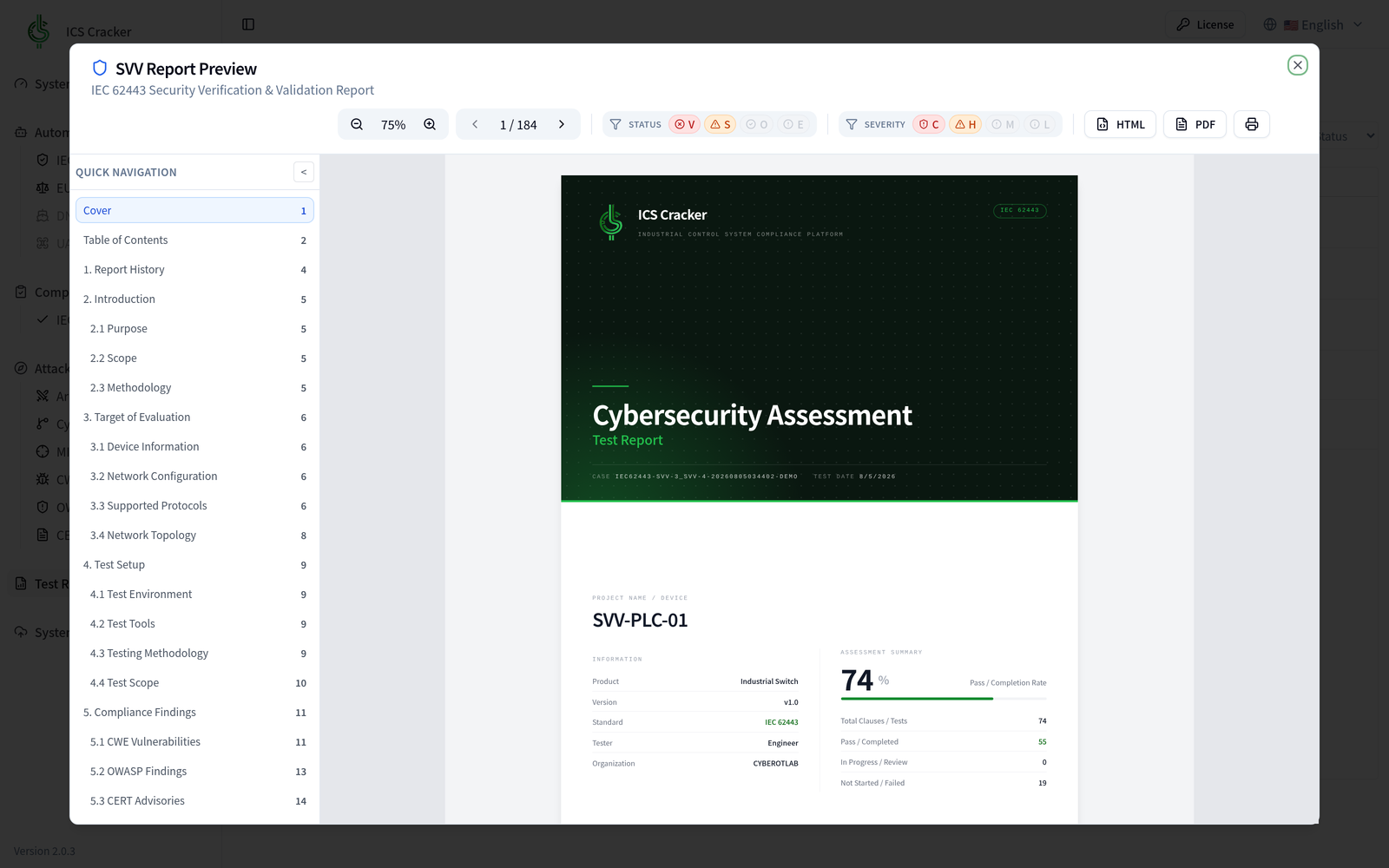
Test report
Structured per test type, with CWE/OWASP/CERT findings and section navigation, exportable to HTML and PDF.
SBOM and VEX
CycloneDX SBOM matched against the vulnerability database and annotated with VEX applicability — quotable in supply-chain and CRA audits.

On the roadmap

  • DNV Maritime and offshore control system class verification
  • UAV Unmanned system security testing over MAVLink and other control links

Plans & Licensing

Pick the plan that matches how you deploy

One platform, three ways to take delivery: install on your own host, buy the appliance preloaded, or image machines in production from the installer ISO. Licence for one year or three.

Software licence

You have the hardware; take the platform

Quote on request Quote on request

Get a quote
  • deb and Docker image, built from the same artefact
  • Runs on your own amd64 + Debian 13 host
  • Works air-gapped — no external cloud service
  • Version updates and plugin licence file (.olic)
Fleet deployment

Image machines in production, many at once

Quote on request Quote on request

Talk to sales
  • Everything in the appliance plan
  • Installer ISO — unattended, with an offline apt pool
  • Licences managed across the fleet
  • Rollout assistance and training

Prices exclude tax. Plugins (OT protocol testing, Web/AIoT penetration, port scanning, compliance rules) are licensed per module; hardware and software licences can be purchased separately.

The shipping hardware model changes with supply; the quotation is the binding specification.

Software & Reports

流程之外的其他畫面。

五步驟導覽走過的是一次檢測從頭到尾的路徑;這裡是平時在用、但不屬於那條路徑的三個畫面。

System Dashboard

系統儀表板

系統儀表板

設備與網路拓撲、任務與掃描狀態、授權、硬體健康與特徵碼版本一頁掌握,儀表板上的設備視圖即為現行機型。

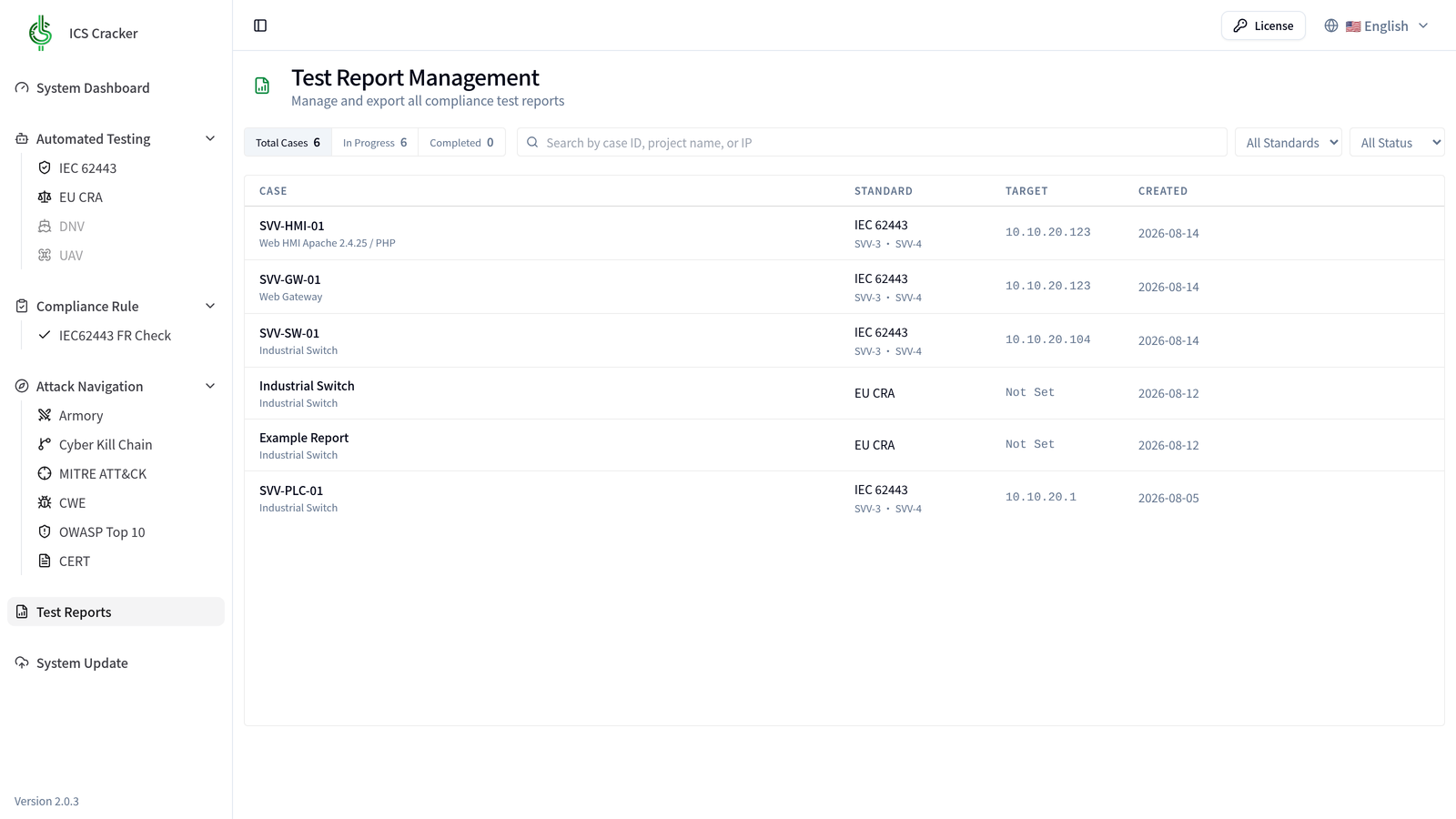
Report Management

測試報告管理

測試報告管理

集中管理 IEC 62443 與 EU CRA 測試案例,依法規、狀態與結果篩選,一鍵預覽或下載合規報告。

Security Health Check

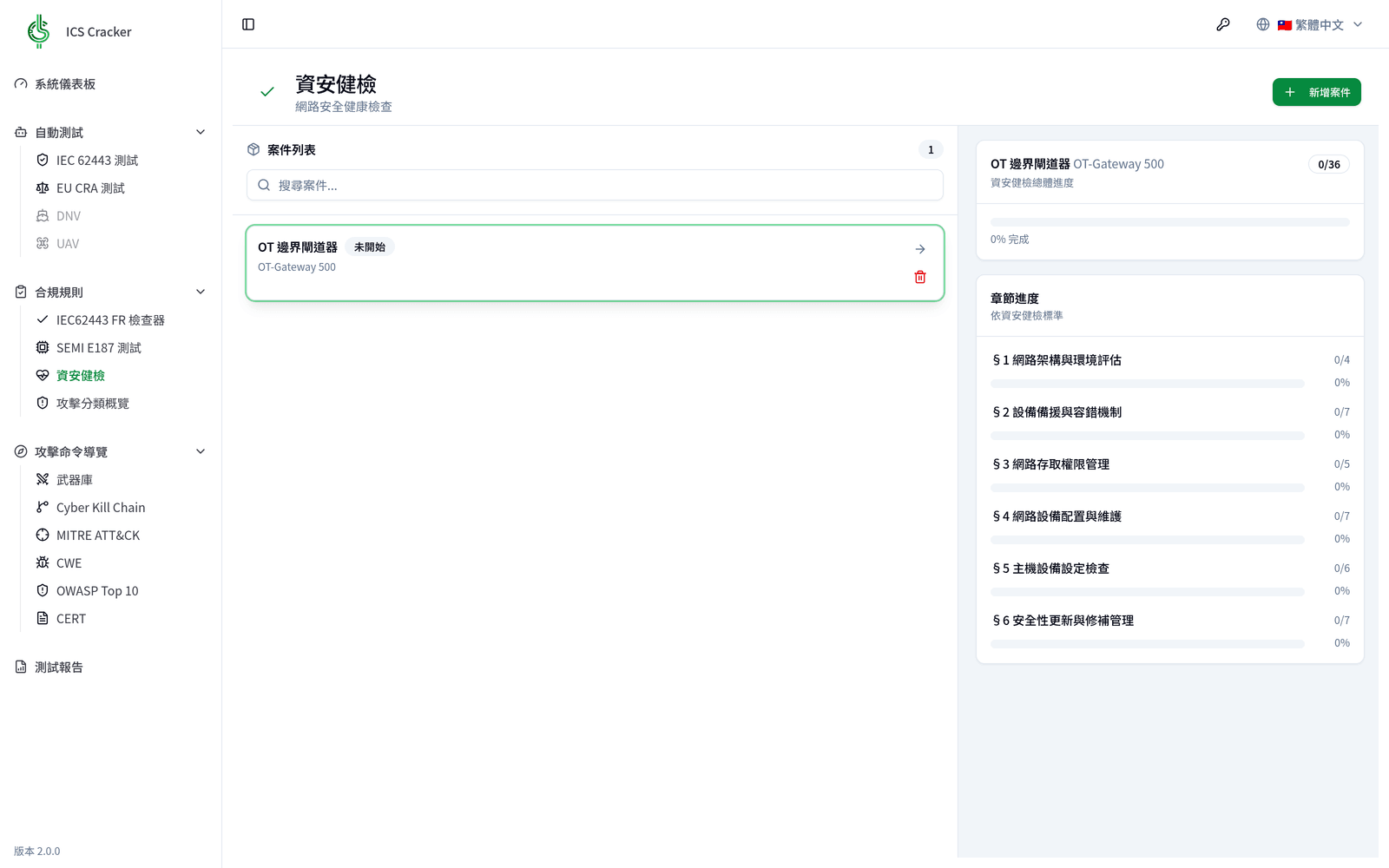
資安健檢

資安健檢

依網路架構、設備存取、組態維護等六大章節檢核 OT 場域安全基線,案例進度與逐項完成度即時追蹤。

Deployment & Attack Scenario

Deployment and red-team attack scenario

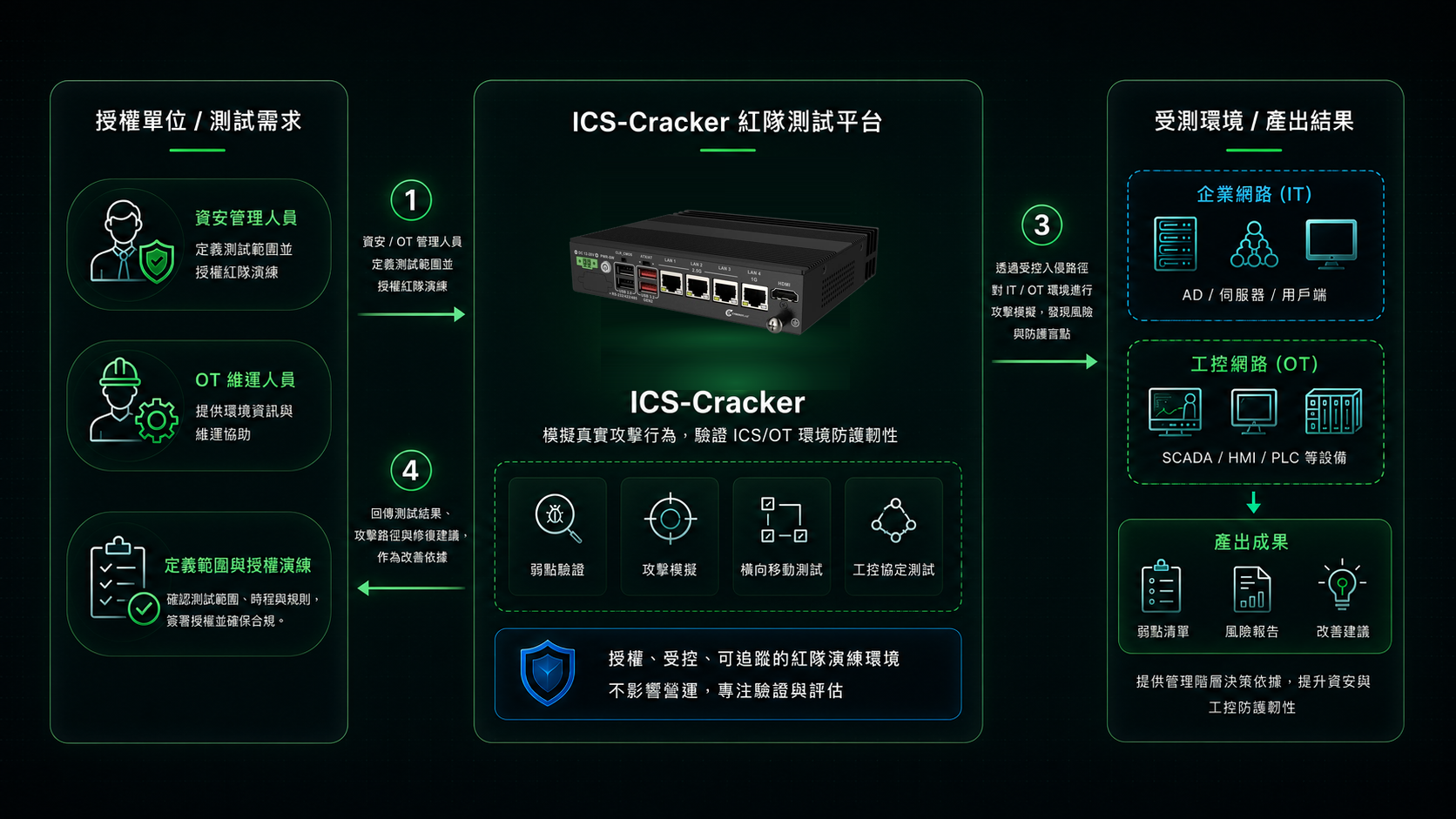
An authorized engagement built around the ICS-Cracker red-team testing platform: security and OT operations staff define the test scope and authorize the exercise; in an authorized, controlled and traceable environment the platform runs vulnerability validation, attack simulation, lateral movement and ICS-protocol testing against the enterprise (IT) and industrial (OT) networks; and it returns a findings list, risk report and remediation recommendations to strengthen IT/OT security resilience.

Deployment and red-team attack scenario
Authorized engagement workflow and deliverables of the ICS-Cracker red-team testing platform (illustrative).

Attack Frameworks

Cyber Kill Chain 與 ATT&CK Matrix for ICS

Cyber Kill Chain

用攻擊鏈看清驗證範圍

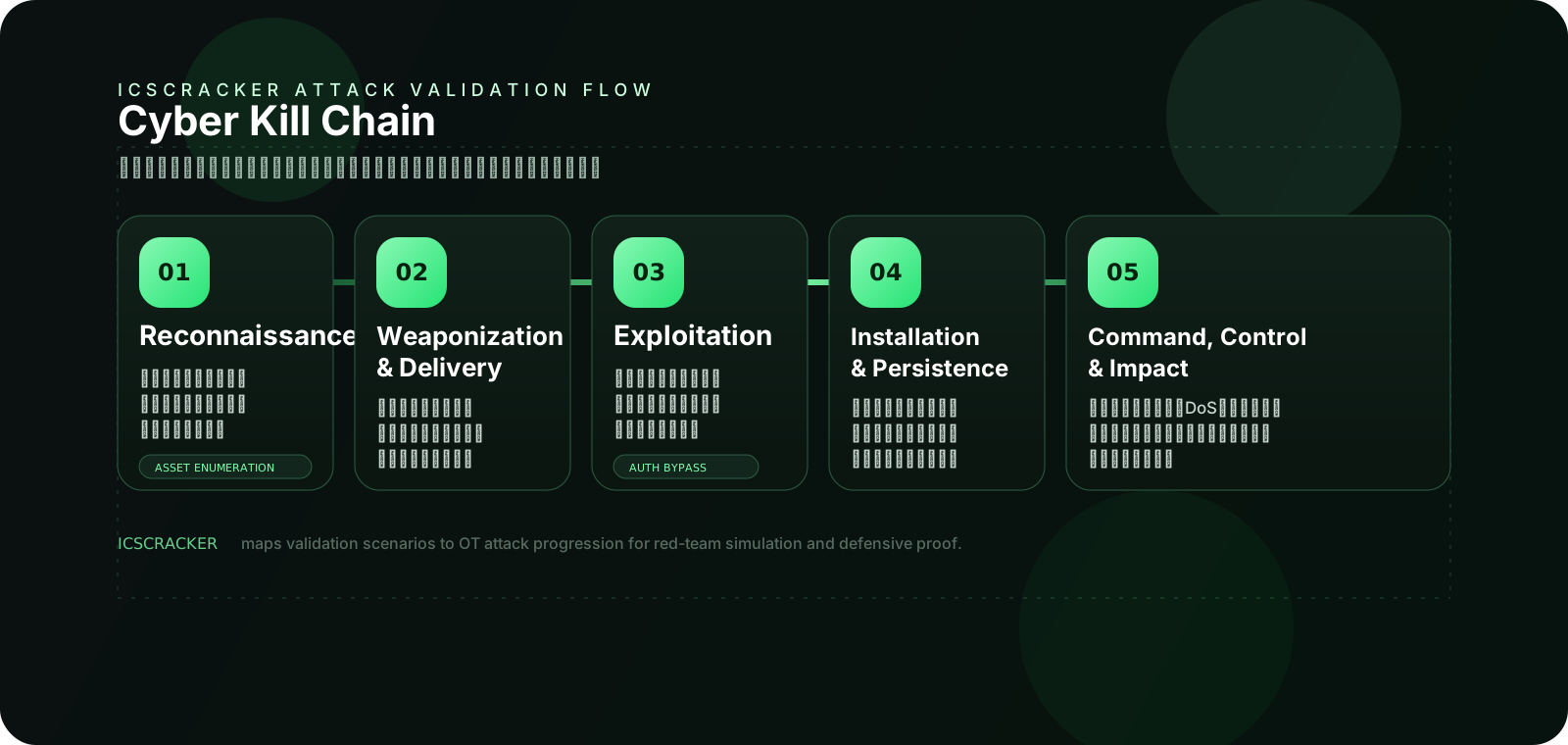
ICSCracker 可把驗證情境映射到攻擊從偵察、投遞到影響的完整路徑,幫助團隊確認每一個防護控制到底攔在哪一段。

ICSCracker Cyber Kill Chain 視覺流程圖,展示 Reconnaissance、Weaponization & Delivery、Exploitation、Installation & Persistence、Command, Control & Impact 五個階段。
把測試情境沿著五個攻擊階段展開,讓展示、驗證與報告都能對齊同一條攻擊路徑。
01

Reconnaissance

模擬攻擊者蒐集資產、協定與通訊關係,驗證環境是否暴露過多資訊。

02

Weaponization & Delivery

建立協定封包、更新檔案或惡意載荷情境,檢查防護是否能辨識異常輸入。

03

Exploitation

重現弱點利用與未授權操作流程,觀察設備、策略與警示機制的反應。

04

Installation & Persistence

驗證更新、配置與權限機制是否可能被用來建立持續控制。

05

Command, Control & Impact

模擬控制指令異常、DoS 或流程干擾,確認系統在最後階段的阻斷與紀錄能力。

ATT&CK Matrix for ICS

用 MITRE ATT&CK for ICS 組織測試場景

ICSCracker 不是隨機做攻擊,而是依據 ATT&CK Matrix for ICS 把測試分類,讓研究、驗證與報告都能對應到共同語言。

TA0108

Initial Access / Lateral Movement

對應外部連入、維護通道與網段橫向移動的驗證,確認邊界與分段控制是否生效。

TA0104

Execution / Evasion

驗證攻擊腳本、協定命令或異常更新流程在設備與平台上是否會被攔截。

TA0105

Impair Process Control

聚焦對控制邏輯、設定與流程參數的干擾,檢查 OT 安全機制如何降低製程風險。

TA0106

Inhibit Response Function

驗證在告警、監控或應變能力遭削弱時,系統是否仍保有可追蹤的證據。

TA0107

Impact

把停機、通訊中斷、異常控制與設備風險納入測試,形成最終報告與證據輸出。

Specifications

Technical Specifications

Test Framework MITRE ATT&CK for ICS
Applicable Scenarios Lab Validation / Product Security Testing
Output Deliverables Test Report / Evidence Package
Compliance Support IEC 62443 / CRA / SEMI E187
Deployment Environment Controlled OT Cyber Lab
Usage Restrictions Cybersecurity Testing Only

Want to learn more aboutICSCracker?

Our expert team is ready to provide product consultation and technical support.